Frequently Asked Questions
Help with Shopify store configuration.
Connections
Sharing sensitive CargoWise eAdaptor credentials:
Some 3PL partners may hesitate to share the credentials needed to connect to CargoWise via its eAdaptor Inbound Service, primarily due to limited security controls over what these credentials can access or modify.
In these cases, a 3PL partner staff member can be temporarily added as a user to the Shopify store, with permissions limited to the Complect Fulfill for CargoWise app. This user can securely enter the required CargoWise credentials to establish the connection. After setup, their access to the Shopify store can be revoked.
All connection passwords are securely encrypted by the app and are never visible through the app interface.
Locations
Order fulfillment requests are not going to the desired location:
- Check the location has shipping rates defined for the order's destination.
- Check that another location hasn't been given shipping order routing priority.
- Check the location has product inventory allocated for all products being ordered.
More detail about setting up your location fulfillments in Shopify.
Products and Inventory
SKU matching:
CargoWise requires that each product in a fulfillment order has Shopify SKUs matching CargoWise product codes. Matching is case-insensitive, but otherwise must be exact - for example, widget001 will match WIDGET001.
If a Shopify fulfillment order contains products with missing SKUs or SKUs that cannot be matched, the order is rejected with a message explaining the issue. After resolving the problem in either CargoWise or Shopify, you can resend the fulfillment request from Shopify.
Inventory management:
Currently, inventory stock quantities are not available via CargoWise's eAdaptor Inbound Service. This prevents the app easily providing inventory management features.
As a workaround we plan to enable inventory management using scheduled CargoWise Stock On Hand Summary reports sent by email. Contact us if you’re interested in being an early adopter of this feature.
CargoWise
CargoWise compatibility:
The app is compatible with both CargoWise One and CargoWise Next.
Support for eAdaptor Next is coming soon. You'll be able to switch your connections between eAdaptor Legacy and eAdaptor Next easily.
Warehouse Orders
The CargoWise warehouse orders generated for Shopify fulfillment requests.
CargoWise isn't receiving orders:
Check your Shopify store setup to ensure:
- Fulfillment has been requested for each order — either manually using the Request fulfillment action or automatically through your Shopify store configuration.
- Order fulfillments are being sent to a location added via the app (not one added outside the app), with the location name matching exactly.
The Order No contains a long sequence of additional digits:
Both the Order No and Customer Ref fields include the original Shopify order number. However, the Order No also appends the unique fulfillment request ID from Shopify, so it appears as #12345.1234567890123 instead of just #12345.
This extra number ensures that if an order is cancelled and then re-requested, a new warehouse order can be created in CargoWise for the same Shopify order number. It prevents updating a previously cancelled order, which may now have outdated or invalid details.
Setting additional fields on imported warehouse orders:
You may want to set extra details for new warehouse orders, such as required dates or transport company.
These additional fields can be configured directly in CargoWise using Workflow Templates for the Warehouse Release (WOU) type.
This approach keeps CargoWise settings under the control of the 3PL partner, allowing changes to be made within CargoWise rather than in the client's Shopify store, which the 3PL partner may not be able to access.
Contact us if you need assistance with this.
The example below shows default values being applied for client TESCLICHC when a warehouse order is Entered for them. The required date <RequiredDate> is being set to one days time <AddDurationToDate("<Now>","DAYS","1")>, and the transport company <TransportCoDocAddress.OrganisationPK> to use is being set to NEWPOSCHC via the <GetGuidByOrgCode("NEWPOSCHC")> search:
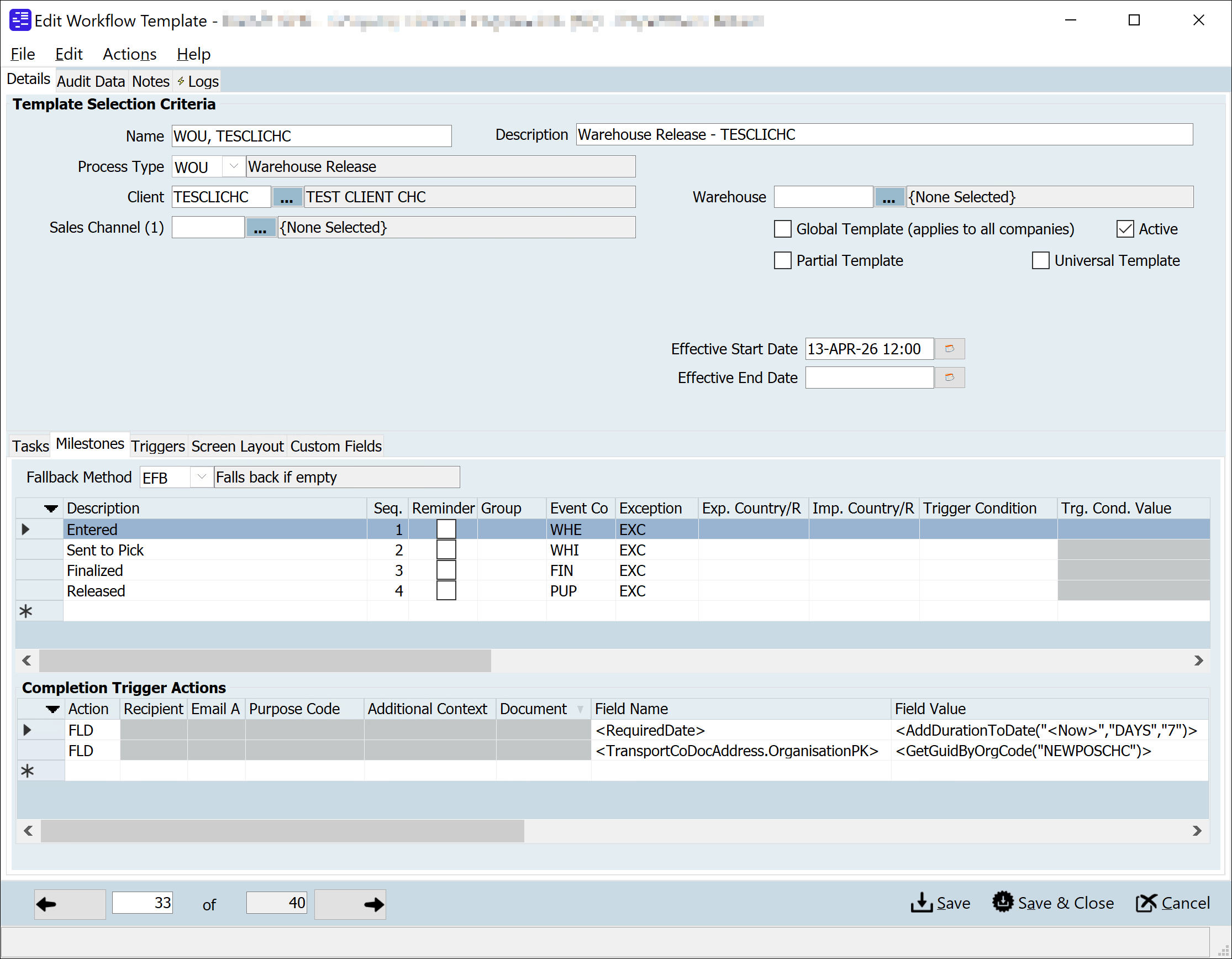
To find the field names for using in your workflow template, in CargoWise, click into the relevant field and press the Ctrl+Shift+R keys on your keyboard to open table and field name information.
Shopify Orders
Shopify order updates:
Shopify orders are updated automatically. The CargoWise warehouse order is checked for updates every 15 / 60 mins, depending on your plan.
If the warehouse order status changes to:
- Departed, the Shopify fulfillment request will be updated as fulfilled. The order will also be updated with the transport company and tracking number if available.
- Cancelled, the Shopify fulfillment request will be rejected.
Additional fulfilled item attributes captured from CargoWise:
When a warehouse order is fulfilled, CargoWise can return more detail about what was actually picked than Shopify's fulfillment record can hold. The app captures the following against each fulfilled order line:
Serial numberPallet IDExpiry date
They are saved to the Fulfilled Item Attributes / fulfilled_item_attributes metafield attached to the order.
The value is an array, and the app appends to it rather than overwriting it. An order that is split across several fulfillment orders - for example when it is fulfilled from more than one location, or partially fulfilled over time - accumulates one entry per fulfillment, in the order the fulfillments completed. Each entry records its fulfillmentOrderId and the CargoWise docketId that produced it.
Example metafield values:
An order fulfilled from a single CargoWise warehouse order, where the first line was picked with a serial number, pallet ID and expiry date, and the second line has no additional attributes recorded:
[
  {
    "fulfillmentOrderId": "gid://shopify/FulfillmentOrder/1234500000001",
    "docketId": "W00012345",
    "itemAttributes": [
      {
        "sku": "WIDGET-001",
        "quantity": 1,
        "serialNumber": "SN-0001",
        "palletId": "PAL-0001",
        "expiryDate": "2027-01-15T00:00:00"
      },
      {
        "sku": "WIDGET-005",
        "quantity": 2
      }
    ]
  }
]
The same order after a second fulfillment order - the remaining items, shipped later from a second warehouse - is completed:
[
  {
    "fulfillmentOrderId": "gid://shopify/FulfillmentOrder/1234500000001",
    "docketId": "W00012345",
    "itemAttributes": [
      {
        "sku": "WIDGET-001",
        "quantity": 1,
        "serialNumber": "SN-0001",
        "palletId": "PAL-0001",
        "expiryDate": "2027-01-15T00:00:00"
      },
      {
        "sku": "WIDGET-005",
        "quantity": 2
      }
    ]
  },
  {
    "fulfillmentOrderId": "gid://shopify/FulfillmentOrder/1234500000002",
    "docketId": "W00012346",
    "itemAttributes": [
      {
        "sku": "WIDGET-002",
        "quantity": 3,
        "palletId": "PAL-0042"
      }
    ]
  }
]
Use Sidekick, Shopify's AI assistant, to view these metafield details from an order or help create a Shopify Flow app workflow to use these details in a business process. You can also reference the metafield in Liquid.